Sayforth
A 30-day speaking program for iPhone, about five minutes a day. One question out loud, your answer drawn as a single line, and one change to carry into tomorrow.
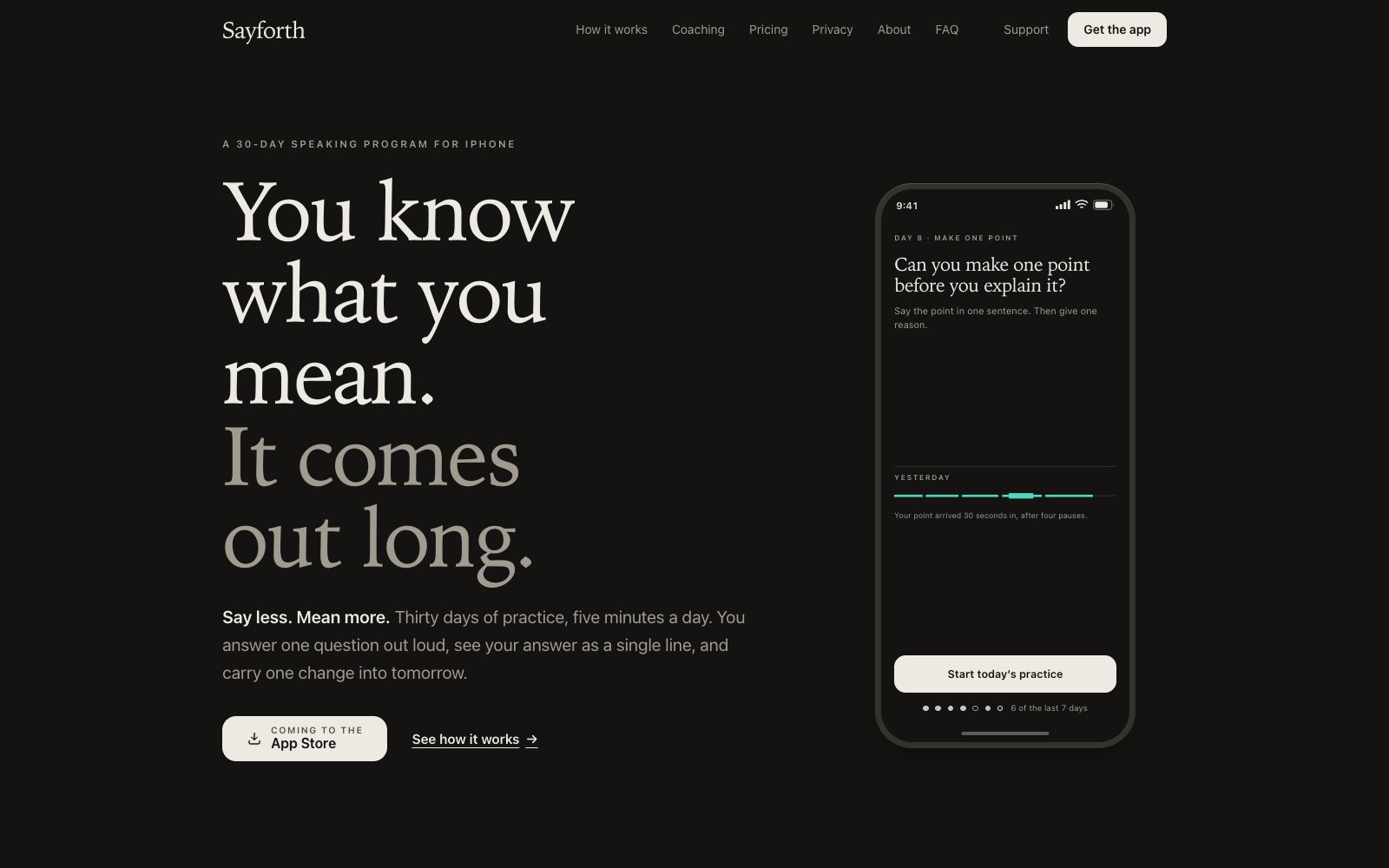
Sayforth gives you one question a day. You answer out loud, the app draws your answer as a single line, and it names one change to carry into tomorrow. The program is thirty days. It is made for interviews first and meetings second.
I decide what it is, how it looks, how it sounds and how it behaves. Claude writes the code. I review every change before it ships, and I play-test every build myself.
- RoleSolo founder
- SinceSeptember 2026
- PlatformAn iPhone app, iOS 17 or later
- BuiltDesigned and directed by me, coded with Claude
- StatusBuilt and in testing. Coming to the App Store
- Linksayforth.app
Why it exists
People know what they want to say. Under pressure it comes out long and hedged.
There is also nowhere safe to practise. A friend is kind and not specific. A recording is painful to replay. A score does not say what to change. I wanted one place to say an answer out loud, see what happened in it, and try again in the same minute.
I researched the idea first, and it pointed at one group: people with an interview in the next few weeks. That shaped the program, with about a minute of speech a day and feedback that names one change. People who go quiet in meetings are the second audience.
The name is say plus forth, which is moving your voice forward.
How it works
-
01
Read the question
The day opens on one card: the question, how long an answer runs, and the one change from your last answer. There is one button. Read the question and tap to begin.
Day 13 of 30Why do you want this role?
About 90 secondsStart Day 13Your one changeCoach’s notes ›Say your main point first.
-
02
Speak
While you talk, a quiet line moves with your voice. There are no scores and no tips on screen, because feedback mid-sentence pulls attention from the sentence.
The ground goes from paper to near black, the way a room dims when someone listens.
Recording0:41Why do you want this role?
Say your main point in one sentence. Then give one reason.
Take your time. Finish -
03
Tap Finish
The phone turns your speech into text and measures pace and pauses on the device. The audio never leaves the iPhone. Only the text and its timing go out for coaching, which an AI model writes to rules I wrote.
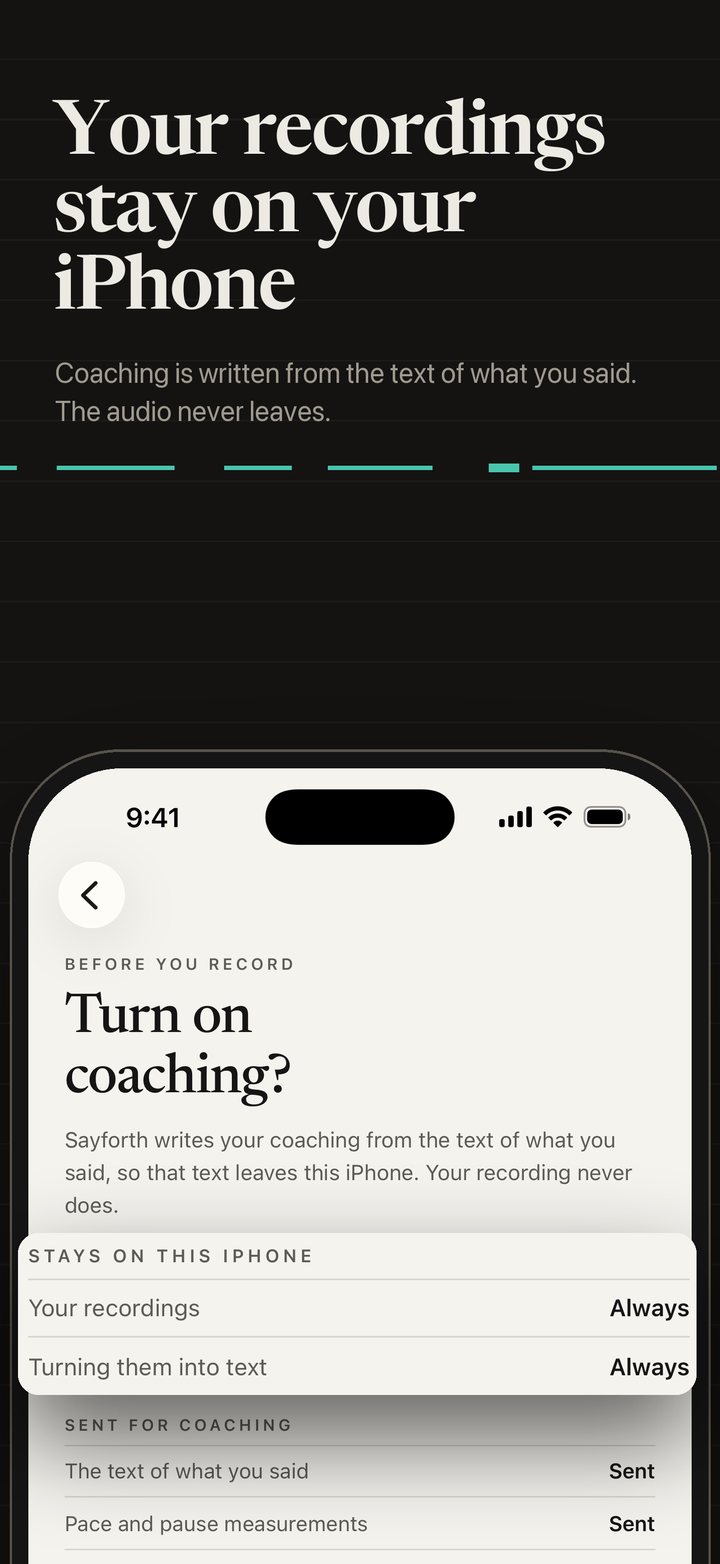
What stays and what is sent, from the App Store images -
04
See the line and one change
The answer is drawn as one line: solid where you spoke, a gap for each pause at its real length, a heavier stretch where the main point landed, and a notch for each softener such as I guess.
Beneath it comes one change in a plain sentence, your words with the main point marked, and a rewrite under Say it like this. In the latest build the headline is the change itself, and the line, its key and other notes sit one tap away under More about this answer.
Your answer, as a lineDay 12 · 0:38Main point Pause, 1.2 s SoftenerSpeechA solid stroke. Its length is how long you spoke.PauseA gap. Its width is the real length of the pause.Main pointThe heavier stretch. Where your point landed.SoftenerA small notch in the line. A word like kind of, or I guess.Day 12 · Your one changeYou got to your main point after 6 seconds.
Your wordsFull answer ›So, um, I’ve worked in support for four years, and I guess what I want now is to build the tools that fix what I keep seeing.
6 seconds before your main pointYour main pointSay it like thisMain point firstI want to build the tools that fix what I keep seeing. Four years in support showed me where they are.
Interviewers decide early. Say your main point first and the rest becomes proof.
Say it again · 30 secondsYou got to your main point 3 seconds sooner. Measured on your iPhone against your first answer.First try6 sAgain3 s -
05
Say it again
Say it again opens right after the coach. You answer the same question once more, in thirty seconds, and the app measures the one thing it asked you to change.
In the App Store image a point that arrived at 19 seconds arrives at 4.
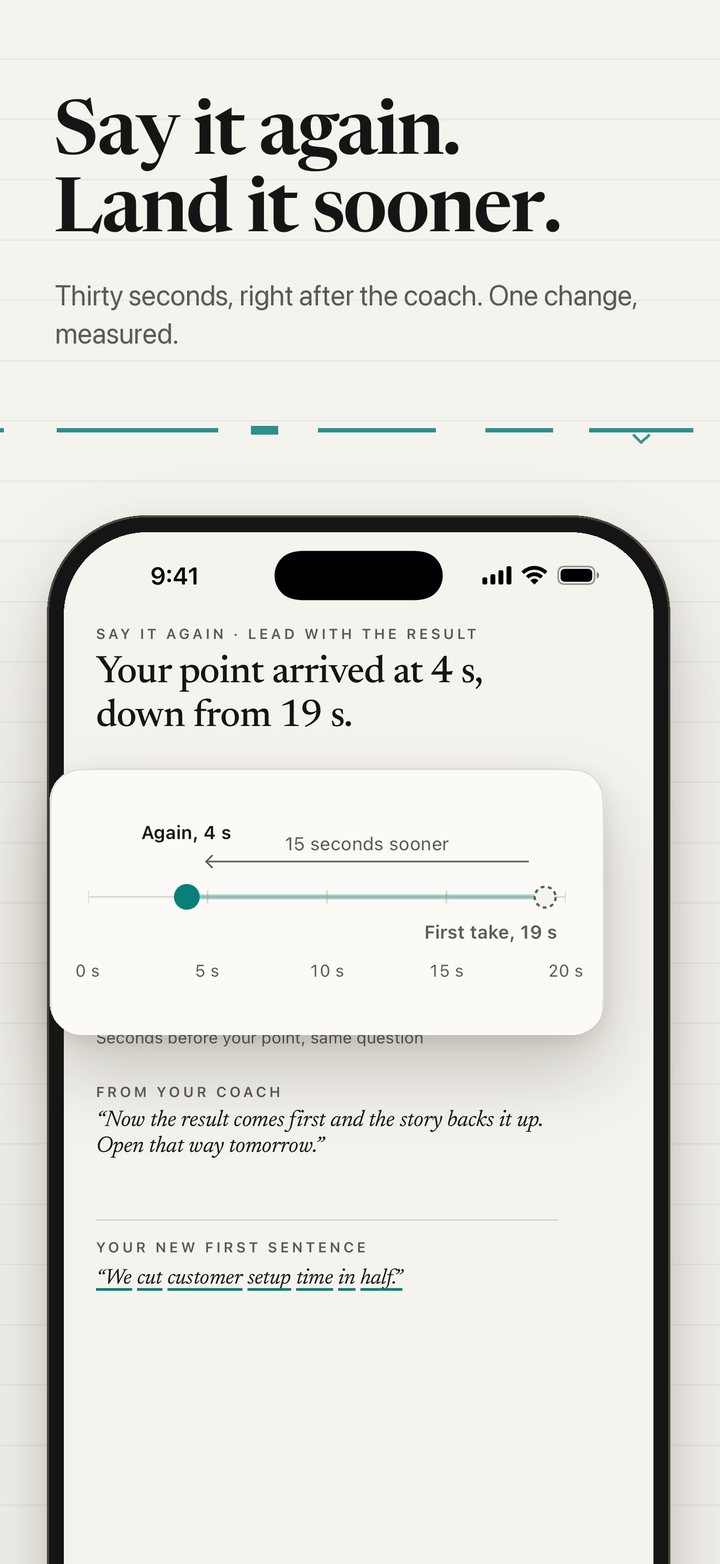
Say it again, from the App Store images -
06
Day 30
Four weeks, one focus each: pace and pauses, main point first, sounding sure, full answers. A missed day can be made up, and rest days are part of the plan.
On Day 30 you answer the Day 1 question again and hear both, with both lines drawn side by side. The You tab keeps your progress as a few cards, each with one big fact.
Your 30 days · Day 12 of 30Twelve answers so far.
Week 1: Pace and pausesDays 1 to 701020304050607Week 2: Main point firstDays 8 to 14080910111213Week 3: Sounding sureDays 15 to 21Week 4: Full answersDays 22 to 3012 dayspracticed41 minspoken7 daysmost in a week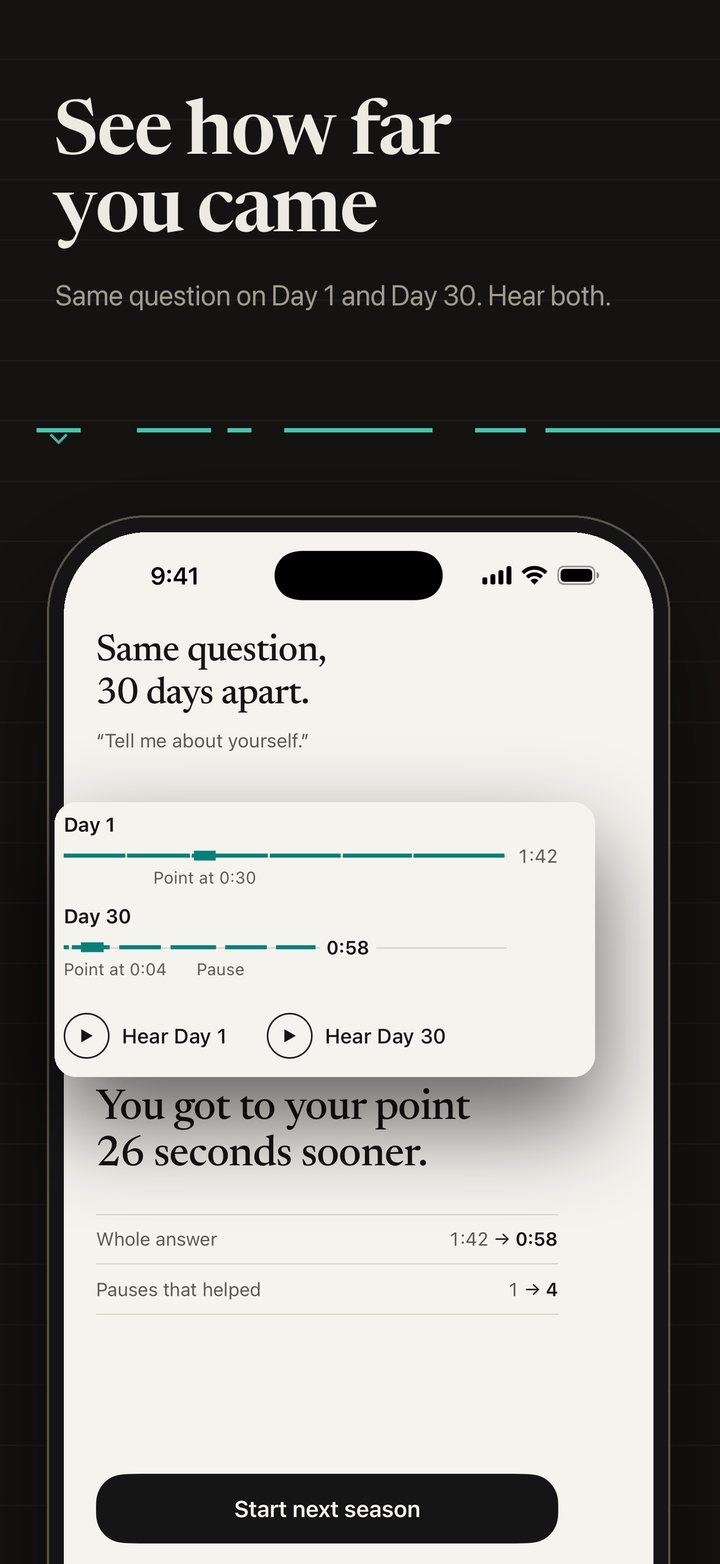
Day 1 and Day 30, from the App Store images
Everything it does
The program
- Thirty days
One question a day, about a minute of speech and five minutes in all, in four weekly chapters.
- Welcome
One screen before the microphone says what Sayforth does and shows the thirty days.
- You
Summary first. Small cards each carry one big fact, such as your one change or your answer as a line, and each opens its own page.
Coaching
- Your answer as a line
Speech, pauses, the main point and softeners, drawn as one line with a key.
- Your one change
One plain sentence, with your words quoted and the main point marked.
- Say it like this
A rewrite of your own answer, main point first.
- Say it again
A thirty-second retry, measured on the iPhone against your first answer.
- More about this answer
Fillers and other notes, one tap from the feedback.
- Coach’s notes
What the coach knows about your habits, saved on the phone. You can edit or clear it.
- Weekly report
A summary of what is improving, with cards that scroll to their detail.
Interview prep
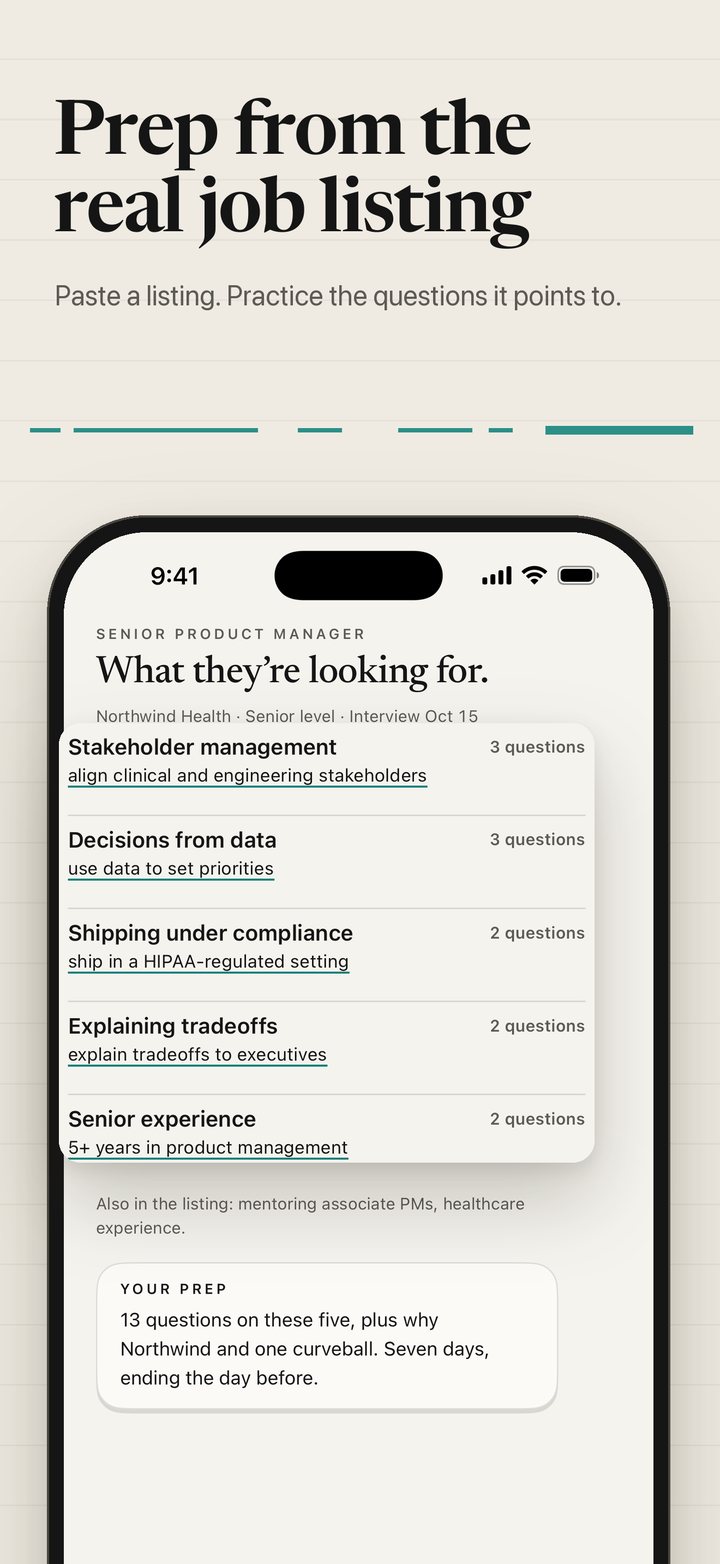
- Paste a listing
Paste a job listing and the app builds practice questions from it.
- A short plan
A plan ends the day before the interview and replaces the daily question until then.
- Add a date
Set the interview date and the plan counts back from it.
Play
- Seventeen games
Short games, one skill each. Your voice moves a paper boat. No points, and three games are silent.
- Grouped by week
The Play tab follows the four weeks. This week’s games come first, with the coach’s pick marked.
- Out loud or quiet
A switch filters by All, Out loud and Quiet.
Privacy and access
- Recordings stay on the phone
The audio never leaves the iPhone.
- No account to start
You can practise without one, and sign in with Apple for more coaching.
- The program is free
The whole thirty-day program is free to start.
- Launch updates
An email signup on sayforth.app for the day it reaches the App Store.
Design decisions


Paper
Ink
Teal
Bright teal
Listening ground
Paper white
- HeadlinesNewsreader, an open-licence serif, chosen 8 October 2026
- Everything elseSystem sans, with tabular digits
- StructureThin rules and space. No cards
- CirclesOnly the record control and the day marker
- LogoThe Newsreader Bold wordmark
The idea is warm ruled paper with a quiet line on it.
Observations, not scores
Sayforth describes what happened in your answer and never grades it. A person cannot practise a number.
One change, not a report
The headline of the feedback is the change. A person can act on one thing.
Nothing is judged while you speak
The recording screen holds the question, a line that follows your voice, and Finish. Everything else waits.
The free plan is the full program
The whole thirty days is free to start. Nothing in the program is held back to sell.
Summary first, detail one tap away
Every screen leads with a few big facts and one primary button. When my testing found the You tab a wall of text, I had it redone as cards.
Colour carries meaning
Teal means your voice. Near black means the app is listening. Everything else is paper.
Motion is quiet. Buttons dim and do not bounce, and the ground moves from light to dark into recording. Confetti, glow and spinners are banned. The reasoning is in The motion rules I wrote for Sayforth.
How I built it
The agent proposes. I decide.
Sayforth is an iPhone app. I decide what it is, how it looks, how it sounds and how it behaves. Claude writes the code. I review every change before it ships.
The process is the work. I write the brief and the rules, and the agents build to them.
A master design prompt. One long brief: who the app is for, how it should feel and what it must never do.
A design board and mockups. I choose the direction by looking, across several rounds, including the logo and typeface.
Written contracts. Each part of the app has a contract for what is built, how it behaves and how it is worded.
Agent-built code. Coding agents build to the approved mockup, and the result has to match it exactly.
Review gates and play tests. Every build passes review gates, then I play-test it and keep a log. The latest log became the summary-first redesign.
- ResearchLooks into the market and the audience.
- Blog draftingWrites drafts to the brand and voice rules for me to read.
- CodingBuilds the app from the approved design and contracts.
- QA and UX auditsChecks screens against the contracts.
- Motion reviewChecks that each movement follows the motion rules.
Timeline
Started: market research, a product strategy and a first running build.
Second version of the design board.
The website and blog go live.
Games direction set: short practice games, one skill each, no points.
First round of logo concepts.
The wordmark is drawn in Newsreader, and the first testing builds reach my iPhone.
Summary first and a one-screen welcome are approved from my test notes and built into the latest testing build.
Writing and content
The Sayforth blog has fifteen posts on interviews and meetings, written since 19 September 2026. Agents draft them and I read each one before it goes live.
Status and what I am working on
The app is built and I am testing it on my own phone ahead of its App Store release.
- Testing the latest build and fixing what the tests turn up
- Writing the rules for how a coaching note may be worded
- Writing the motion rules for how it behaves